
SlimSubs
Sell subscriptions
on WordPress
WordPress Subscriptions Plugin
SlimSubs is a WordPress plugin that lets you sell recurring subscriptions — monthly memberships, coaching retainers, premium content access — with no extra plugins required.
Install it, create a plan, and you're ready to charge.
One plugin. Full subscription management.
Sell recurring plans
Set any price and billing cycle: weekly, monthly, every 3 months, yearly. One plugin handles all of them. You can run multiple plans at the same time — a monthly tier and an annual tier for the same product, for example.
Restrict content to subscribers
Any WordPress page or post can be restricted to a specific plan. Open the editor, select the required subscription in the sidebar, save. Non-subscribers see a paywall message you control.
Let customers manage themselves
Subscribers access Stripe's Billing Portal to update their payment method, download invoices, or cancel. You don't handle any of that manually.
Trusted by WordPress developers
and small businesses worldwide
SlimSubs handles everything between "customer wants to subscribe" and "customer has access." You create a plan, set the price and billing cycle, and SlimSubs takes it from there: Stripe Checkout processes the payment, the subscription activates, and your customer gets the WordPress role that unlocks the content or service they paid for.
When their subscription renews, Stripe bills them automatically and access continues. When they cancel, access is revoked. You don't configure any of this manually — it happens through Stripe webhooks.
What's included
Every feature that ships with SlimSubs.
Stripe Checkout — hosted, PCI-compliant
Payment forms are served by Stripe, not your server. Your site never handles card data, which means you're PCI compliant without any extra configuration. Stripe Checkout also supports Apple Pay, Google Pay, and local payment methods automatically depending on the customer's region.
Role-based access control
Each subscription plan is linked to one or more WordPress roles. SlimSubs grants those roles when a subscription activates and revokes them when it expires or is cancelled. A customer with two active subscriptions keeps their roles until both lapse — no accidental lockouts.
Free plans and free trials
You can create a plan with a price of zero — it activates immediately with no Stripe session and no card required. Useful for freemium tiers, lead magnets, or beta access. For paid plans, you can add a trial period of any length before the first charge.
Custom billing intervals
Choose daily, weekly, monthly, or yearly, then set the interval count. Bill every week, every two weeks, every 3 months — whatever your business model requires. Each plan has its own cycle.
Stripe Billing Portal
Customers who subscribed on a paid plan get a "Manage subscription" button in their account panel. It opens Stripe's Billing Portal, where they update payment details, see their invoice history, and cancel if they choose. You receive a webhook and access is adjusted automatically.
One-time signup fee
Plans can include an optional one-time fee collected together with the first recurring payment in a single Stripe Checkout session. Subsequent renewals bill only the recurring price. Useful for onboarding costs, setup charges, or any amount you want to collect once at the start of a subscription.
Admin overview
The WordPress admin panel shows all active subscriptions, their status, next payment date, and payment history. No need to cross-reference the Stripe dashboard for day-to-day operations.
Pause & Resume billing
A subscriber who needs a break can pause their billing directly from the account panel. While paused, Stripe stops generating invoices. The subscription can be resumed at any time without going through checkout again.
Limited-run plans
A plan can be set to stop renewing automatically — either after a fixed number of payments, or on a specific date. When the limit is reached, Stripe stops charging and the customer's access continues until the end of the last paid period. No manual cancellation, no chasing customers — useful for intro offers, seasonal access, or any plan that's meant to run for a defined time.
Plan switching — upgrade or downgrade
Subscribers can move to a different plan from the account panel without cancelling and resubscribing. Stripe calculates the prorated credit or charge automatically and applies it to the next invoice. WordPress roles update immediately — roles from the old plan are removed and roles from the new plan are granted.
Coupon and promotion codes
Each plan has a toggle that adds a promotion code field to its Stripe Checkout page. Stripe validates the code and applies the discount — SlimSubs doesn't store or process codes itself. Create discount codes in your Stripe Dashboard, enable them per plan, and Stripe handles the rest.
Webhook-driven status updates
Stripe notifies SlimSubs of every event: successful payment, failed payment, cancellation, renewal. Subscription status and WordPress role assignment follow the webhook, not the checkout redirect — so a browser crash or closed tab never leaves a subscriber in a broken state.
Automatic upsell email
When a limited-run plan is about to end, SlimSubs emails the customer automatically — 7 days before expiry — with a direct link to subscribe to a standard plan. The email subject and body are editable per plan. No manual follow-up needed: the customer gets one email, at the right moment, with one clear next step.
Action hooks for developers
SlimSubs fires WordPress actions at every subscription lifecycle event. Other plugins hook into these to extend functionality — send a welcome email, issue a license key, trigger a CRM update — without modifying SlimSubs itself.
What people build with SlimSubs
Two things SlimSubs is especially good at.
Recurring Services
Monthly retainers, coaching, consulting — any service you deliver on an ongoing basis.
A nutritionist creates a "Nutrition Plan" subscription at $79/month. A client subscribes, pays through Stripe Checkout, and immediately gets access to a private WordPress page with their meal plan, tracking sheets, and a booking link for their weekly check-in call.
Every month Stripe renews the subscription automatically. When a client decides to stop, they cancel through the Billing Portal, Stripe sends a webhook, and access closes at the end of the billing period. The nutritionist doesn't do anything manually.
Commonly used for: nutrition plans, personal training, life coaching, business consulting, monthly strategy sessions, legal or financial retainers.
Premium Content & Memberships
Paywalled posts, member newsletters, exclusive libraries — content your audience pays to access.
A writer creates a "Member" subscription at $9/month. New subscribers get a WordPress role called member. Every post or page marked as members-only is automatically hidden behind a paywall for anyone without that role.
The writer publishes content exactly as they always have — the only difference is ticking a checkbox in the editor sidebar that says "Members only." SlimSubs handles everything else.
Commonly used for: newsletters with exclusive posts, research and analysis, tutorials, niche communities, premium podcast archives, recipe libraries.
How it works
Getting started
From install to live checkout in three steps.
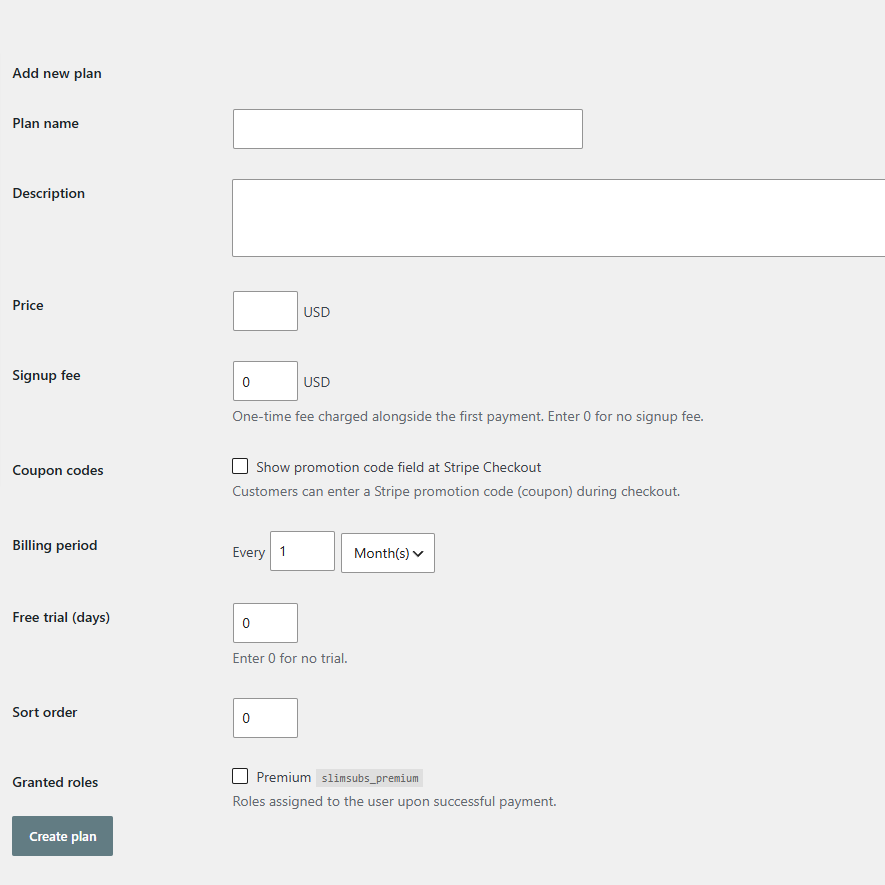
Step 1 — Create a plan
Go to SlimSubs → Plans. Enter a name, price, and billing cycle. SlimSubs creates the corresponding product and price in Stripe automatically — no manual Stripe dashboard setup needed. For a free plan, leave the price at zero.
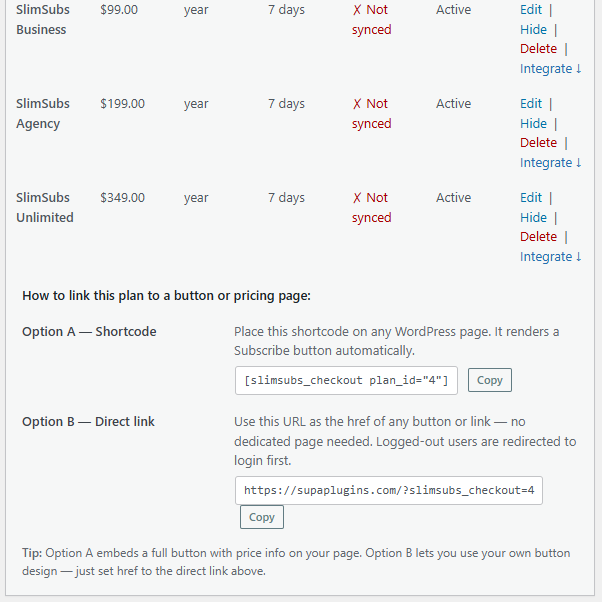
Step 2 — Place the checkout shortcode
Add shortcode or direct link to any page. That renders a Subscribe button with the plan price and billing cycle displayed below it. Logged-out visitors see registration and login links. Existing subscribers see their current status.
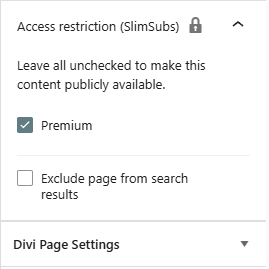
Step 3 — Restrict your content
Open any post or page in the editor. In the right sidebar, find the *Access Restriction* box and select the plan required to view this content. Save. Non-subscribers see a paywall message — you control the text.
Pricing
One licence covers your whole WordPress installation.
Every plan includes all features.
The licence limit is the number of WordPress sites where you can activate SlimSubs.
SlimSubs
Starter
1 WordPress site- 1 WordPress site
- All features
- 7-days trial
- 1 year of updates
- Email support
SlimSubs
Business
3 WordPress sites- 3 WordPress sites
- All features
- 7-days trial
- 1 year of updates
- Email support
SlimSubs
Agency
10 WordPress sites- 10 WordPress sites
- All features
- 7-days trial
- 1 year of updates
- Email support
SlimSubs
Unlimited
Unlimited WordPress sites- Unlimited WordPress sites
- All features
- 7-days trial
- 1 year of updates
- Email support
✓ Prices in USD ✓ Annual licence, cancel any time ✓ Instant delivery after purchase
Payments powered by Stripe. We do not store or process your card details.
From people using SlimSubs
What our customers say.
★★★★★
I set up a monthly plan for my nutrition clients in about 20 minutes. Stripe handles the billing, SlimSubs handles the access, and I haven't had to touch it since.
Sarah K., registered nutritionist, Toronto
★★★★★
I run a members-only newsletter on WordPress. SlimSubs does exactly what I need — subscribers get access, everyone else sees a paywall. No complicated setup.
James L., independent writer, Edinburgh
★★★★★
We manage subscription sites for several clients. The Agency plan makes sense economically, and the webhook-driven architecture means things actually work reliably.
Tomasz W., agency owner, Warsaw
Comparison table
Keep factual. No commentary. Let numbers speak.
How the numbers compare
SlimSubs vs WooCommerce Subscriptions
| SlimSubs Starter | SlimSubs Business | WC Subscriptions | |
| Price per year | $49 | $99 | $279 |
| Sites covered | 1 | 3 | 1 |
| Requires WooCommerce | No | No | Yes |
| Stripe-native checkout | Yes | Yes | Via gateway plugin |
| Free plans (no card) | Yes | Yes | No |
| Role-based access control | Built-in | Built-in | Requires extra plugins |
| Self-service billing portal | Stripe Portal | Stripe Portal | Stripe Portal |
| Free trials | Yes | Yes | Yes |
Questions
Frequently asked questions.
Can I offer a free trial before charging?
Yes. Each paid plan has an optional trial period in days. The customer is redirected to Stripe Checkout, enters their payment details, and isn't charged until the trial ends.
Can I restrict individual posts rather than whole sections of the site?
Yes. Restriction is set per post or per page. You choose exactly which content requires a subscription — everything else stays public.
Can I sell both a monthly and a yearly plan for the same product?
Yes. Create two plans with the same role and different billing cycles. Place both shortcodes on your pricing page. A customer can subscribe to either one.
Which version of WordPress and PHP do I need?
SlimSubs requires WordPress 6.0 or higher and PHP 8.0 or higher. It does not require WooCommerce or any other plugin.
Do I need a Stripe account?
Yes, for paid plans. You connect your Stripe account in the SlimSubs settings by entering your API keys. Free plans (price = $0) activate without Stripe — no keys needed for those.
Does SlimSubs work for selling software or plugins?
Yes — SlimSubs uses this model itself. When a subscription activates, you can hook into slimsubs_subscription_activated to issue a license key automatically via the companion License Manager plugin, which is available separately.
Which payment methods does Stripe Checkout support?
Credit and debit cards, Apple Pay, Google Pay, and regional payment methods based on your Stripe account and the customer's location. SlimSubs doesn't configure this — Stripe handles it automatically.
What happens if a payment fails?
Stripe retries the payment according to your retry settings in the Stripe dashboard. If all retries fail, Stripe cancels the subscription, sends a webhook, and SlimSubs revokes the subscriber's access. You can configure email notifications for failed payments inside Stripe.
Can I migrate from WooCommerce Subscriptions?
Automatic migration is not available yet. Manual migration is possible — contact us and we'll walk you through it.
Is there a refund policy?
You have a 7-day trial to test SlimSubs. If you still need a refund, please contact us and we will do our best to resolve your issue.
Ready to start charging for your content or services?
Install SlimSubs, create your first plan, and you'll have a live Stripe checkout on your WordPress site in under 15 minutes. Subscriptions activate automatically, roles are assigned and revoked without manual work, and your customers manage themselves through Stripe's Billing Portal.
SlimSubs by SupaPlugins